
Hi Readers:
Customization is the process of change according to your needs. Today Free Software Advisor will tell you the process " How to Change theme/skin of open source VLC media Player"

I am currently using Apple iPhone skin for VLC Media Player
VLC media player is the mostly used open source media player, which nearly supports all the audio/video formats. Here is a customization tip for all of you. Using this feature you can set any of your favirite skin for VLC media player (Winamp Skin, Windows Media Player Skin, iPod Skin and many more to choose from).
Step : 1
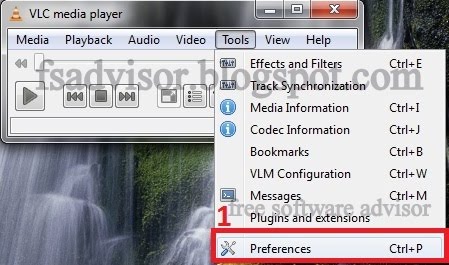
First of all you need to open VLC media player and as shown below, from tool bar click Tools > references
 Step : 2
Then click the check box Skins and in
Step : 3
click VLC skins website as shown in the image below.
 Step : 4
In this step yo need to download the zipped folder containing 105 skin files.
 Step : 5
After Downloading the skins folder, you'll need to unzip the folder. Or copy all of the skin files to any other folder
Now click Browse to the destination folder and choose your favorite skin to be used on VLC media player
 Step : 6
Restart the VLC Media Player and enjoy the theme.
To change the new theme follow the same process: Just with change in step 1:
now you'll need to right click to go to the Preference tab
Customization is the process of change according to your needs. Today Free Software Advisor will tell you the process " How to Change theme/skin of open source VLC media Player"

I am currently using Apple iPhone skin for VLC Media Player
VLC media player is the mostly used open source media player, which nearly supports all the audio/video formats. Here is a customization tip for all of you. Using this feature you can set any of your favirite skin for VLC media player (Winamp Skin, Windows Media Player Skin, iPod Skin and many more to choose from).
Step : 1
First of all you need to open VLC media player and as shown below, from tool bar click Tools > references
Then click the check box Skins and in
Step : 3
click VLC skins website as shown in the image below.

In this step yo need to download the zipped folder containing 105 skin files.

After Downloading the skins folder, you'll need to unzip the folder. Or copy all of the skin files to any other folder
Now click Browse to the destination folder and choose your favorite skin to be used on VLC media player

Restart the VLC Media Player and enjoy the theme.
To change the new theme follow the same process: Just with change in step 1:
now you'll need to right click to go to the Preference tab


