
Showing posts with label VLC media Player. Show all posts

Fastest Way to Download Videos from Youtube and Many Sites

Hello Readers:
Many you spend lot of time watching your favorite videos on Youtube Almost everyone of you likes to download videos from youtube to watch them offline. But the new interface of youtube has been changed and many of you are facing trouble to download youtube videos.
Free Software Advisor is here to tell you how to make the process of Video downloading from Youtube so fast that you can not only download the videos with one-click but with accelerated download speed too. Its sounds interesting naa.

Yup: Internet Download Manager is the worlds # 1 Download Manger and accelerator that can increase the download speed upto 5 times and which has the built-in feature of video grabbing/downloading from any site that has videos embedded and running including Youtube.

After you have installed the IDM, Button with name "Download This Video" pops up whenever you open a webpage contining video in it. IDM silently tracks the direct link of the running video and keeps it saved and waits for the press of the button to start the accelerated downloading. Just click on the button to start downloading videos!
You can download videos from many websites Youtube, MySpaceTV, Google Videos, Tv-links.co.uk, MetaCafe.com, video.xanga.com, www.break.com, www.dailymotion.com, www.esnips.com, and many others. 
Download
The following link is 100% working crack IDM ...Download and enjoy downloading videos at 5 times higher speed

How to set Apple iPhone Skins: VLC Media Player 100+ Awesome Skins

Hi Readers:
Customization is the process of change according to your needs.  Today Free Software Advisor will tell you the process " How to Change theme/skin of open source VLC media Player"


I am currently using Apple iPhone skin for VLC Media Player
VLC media player is the mostly used open source media player, which nearly supports all the audio/video formats. Here is a customization tip for all of you. Using this feature you can set any of your favirite skin for VLC media player (Winamp Skin, Windows Media Player Skin, iPod Skin and many more to choose from).
Step : 1
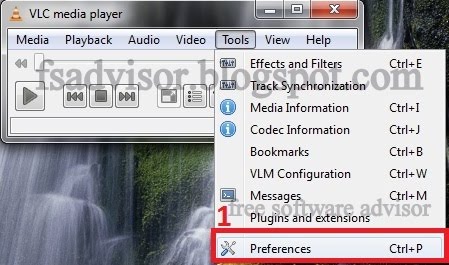
First of all you need to open VLC media player and as shown below, from tool bar click Tools > references
Step : 2
Then click the check box Skins and in
Step : 3 
click VLC skins website as shown in the image below.
Step : 4
In this step yo need to download the zipped folder containing 105 skin files.
Step : 5
After Downloading the skins folder, you'll need to unzip the folder. Or copy all of the skin files to any other folder
Now click Browse to the destination folder and choose your favorite skin to be used on VLC media player
Step : 6
Restart the VLC Media Player and enjoy the theme.
To change the new theme follow the same process: Just with change in step 1:
now you'll need to right click to go to the Preference tab
Related Posts with Thumbnails